After upgrading Kubuntu, I decided to clean up my boot menu. I had been using Grub Customizer just to rename entries, but all I really wanted was this:
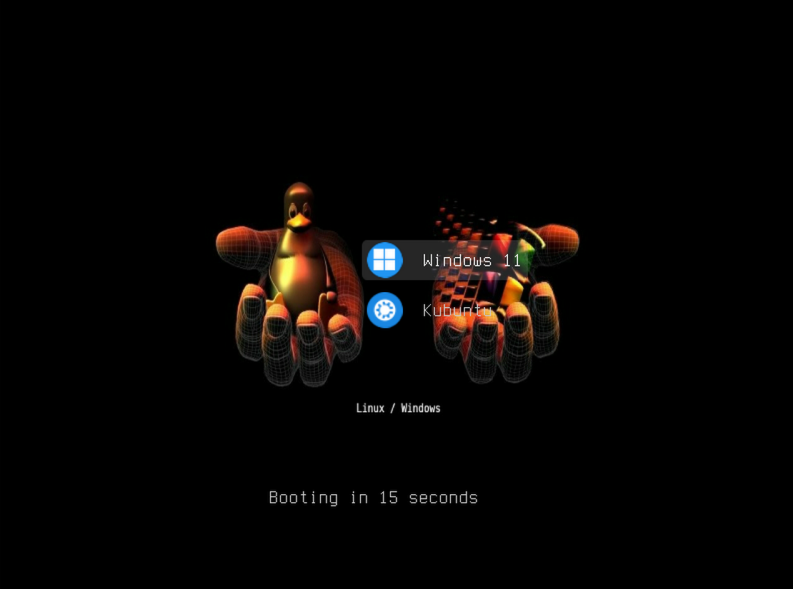
Windows first and selected by default, and Kubuntu pointing to /boot/vmlinuz and /boot/initrd.img. On my system, those are symbolic links maintained by the kernel packages, so the entry doesn’t need to reference a specific kernel version.
Removing Grub Customizer turned out to be only part of the job. It had left scripts and custom entries behind, and regenerating the menu brought back duplicate entries. After cleaning those up, I got the menu working the way I wanted.
Then I turned the setup into a reusable Bash script!
The script detects filesystem UUIDs and the Windows EFI loader instead of relying on my machine’s disk names. It’s organized into functions, includes a preview mode, and creates a backup before applying changes. If generation or validation fails, it restores the previous configuration.
To try the preview:
git clone https://github.com/gregodadone/simplify-dual-boot-grub-entries.git
cd simplify-dual-boot-grub-entries
sudo bash menu-dual.sh
Nothing changes in GRUB unless you add --apply.
This is intended for Linux and Windows installations using GRUB and UEFI. It doesn’t cover every setup: encrypted systems, RAID, ZFS and legacy BIOS boot need a different approach. Check the README for the supported configurations before applying it.
Here’s the source code: simplify-dual-boot-grub-entries.
I hope you find it useful!